Introducing Hoola: A Playful Font for Engaging Web Designs
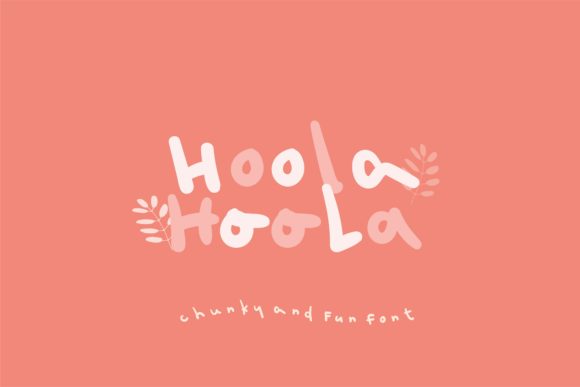
As a web designer, I'm always on the lookout for fonts that can add a unique and inviting touch to my projects. Recently, while working on a creative portfolio site, I stumbled upon Hoola, a chunky, handwritten font that instantly caught my eye. Its playful and uneven lettering brings a sense of joy and personality to any design, making it perfect for creating memorable and engaging user experiences.
First Impressions: Testing Hoola in a Hero Section
One of the first places I tested Hoola was in the hero section of a client's portfolio website. The font's chunky, handwritten style stood out beautifully against a clean, minimalist background. It added a touch of creativity and warmth, which perfectly complemented the artist's work. The bold, uneven letters made the headline feel more human and less robotic, immediately drawing the viewer's attention.
Visual Characteristics and Personality
Hoola is characterized by its uneven, playful, and chunky lettering. This handwritten font has a fun, almost childlike quality, which makes it ideal for projects that need a friendly and approachable vibe. Whether you're designing a boutique online store, a coaching website, or a product landing page, Hoola can help set the right tone and make your content feel more relatable and engaging.
Readability and Visual Hierarchy
While Hoola is visually appealing, it's important to consider its readability, especially on smaller screens. For mobile layouts, I found that using Hoola for short, impactful headlines and call-to-action areas worked best. The font's chunky style can be a bit too much for longer text, so it's essential to pair it with a clean, simple sans serif font for body copy. This combination not only enhances readability but also creates a balanced and professional look.
Using Hoola in Different Sections
- Hero Titles: Perfect for grabbing attention and setting the tone of the page.
- Section Headings: Adds a playful and engaging element to different sections of the website.
- Buttons and Short Phrases: Works well for adding a touch of personality to buttons and short, impactful phrases.
- Logo Text and Decorative Accents: Ideal for creating a unique and memorable brand identity.
Font Pairing and Consistency
When using Hoola, it's crucial to pair it with a complementary font to maintain a consistent and professional look. For example, I paired Hoola with a simple sans serif font like Lato for the body text on a coaching website. This combination not only improved readability but also created a harmonious and polished overall design. Additionally, using a serif font for a more editorial digital identity, such as in a blog header, can add a touch of sophistication and balance to the layout.
Practical Examples and Use Cases
Here are some practical examples of how I've used Hoola in various web design projects:
- Creative Portfolio Site: Used Hoola for the main headline and section titles, paired with a clean sans serif for the body text.
- Boutique Online Store: Featured Hoola in the banner and promotional graphics, creating a welcoming and personal shopping experience.
- Course Sales Page: Employed Hoola for the course title and key benefits, making the page feel more engaging and trustworthy.
- Blog Redesign: Incorporated Hoola for the blog header and category tags, adding a playful and modern touch to the design.
Readability Tips for Mobile and Responsive Layouts
To ensure Hoola remains readable and engaging across all devices, here are some tips:
- Mobile Screens: Use Hoola for short, impactful headlines and avoid using it for long paragraphs.
- Responsive Layouts: Test the font at different screen sizes and adjust the font size and line height as needed.
- Dark Backgrounds: Increase the font weight slightly to ensure the text stands out clearly.
- Light Backgrounds: Keep the font weight as is, but consider using a subtle color to add visual interest.
- Image Overlays: Add a slight drop shadow or use a solid color box behind the text to improve legibility.
Final Considerations Before Using Hoola
Before incorporating Hoola into your web designs, make sure to check the following:
- Included Styles: Explore the different styles and weights available to find the one that best fits your project.
- Webfont Availability: Ensure the font is available in webfont format for seamless integration into your website.
- File Formats: Confirm that the font comes in the necessary file formats (e.g., .ttf, .woff) for web use.
- Alternates and Multilingual Support: Check if the font includes alternate characters and supports the languages you need.
- Commercial Licensing: Verify that the font license allows for commercial use, especially if you're working on client projects or online stores.
Hoola is a versatile and charming font that can add a unique and joyful touch to your web designs. By carefully considering its use in different sections and pairing it with complementary fonts, you can create a more engaging and memorable online brand experience. Give Hoola a try and see how it can transform your next project!